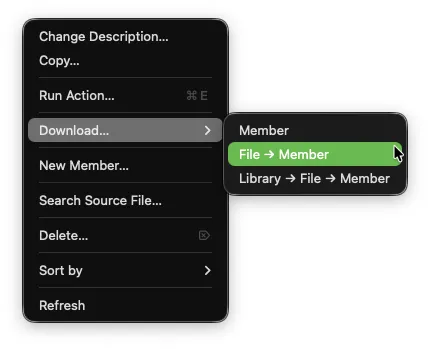
Download… in the Object Browser is a submenu that offers three ways to download IBM i source members to a local folder. The original single-member download is still available as Member, and two new structured layout options organize downloads into subfolders that reflect the IBM i QSYS hierarchy.
The structured options are particularly useful when migrating IBM i source into a Git repository, as they produce a folder layout that is ready for version control.
How to Use
In the Object Browser/Filter, right-click one of the following:
A source physical file (PF-SRC) name — downloads all members in that file
Select one or more source members — downloads the selected members
Hover over Download… to reveal the submenu
Choose a download option:
Member — saves a single member via a Save-as dialog (original behavior)
File → Member — structured download to a subfolder named for the Source File
Library → File → Member — structured download to a library->file folder structure with the members stored under the file name folder.
For structured options, choose a base download folder on your local machine when prompted
Subfolders and files are created automatically
Download Options
Library → File → Member
Use this when you want the full IBM i path preserved locally.
Given IBM i source in library DEVLIB:
DEVLIB
├── QRPGLESRC
│ ├── PROGRAMA.RPGLE
│ ├── PROGRAMB.RPGLE
│ └── PROGRAMC.RPGLE
├── QCLLESRC
│ └── STARTJOB.CLLE
├── QCMDSRC
│ └── STARTJOB.CMD
└── QSQLSRC
├── CUSTOMERS.SQL
└── INVENTORY.SQL
After choosing ~/myproject as the base download folder:
~/myproject/
└── DEVLIB/
├── QRPGLESRC/
│ ├── PROGRAMA.RPGLE
│ ├── PROGRAMB.RPGLE
│ └── PROGRAMC.RPGLE
├── QCLLESRC/
│ └── STARTJOB.CLLE
├── QCMDSRC/
│ └── STARTJOB.CMD
└── QSQLSRC/
├── CUSTOMERS.SQL
└── INVENTORY.SQL
File → Member
Use this when want the source files to sit directly inside your project folder with their members below them — for example, downloading to a folder named Pickles that receives QRPGLESRC, QCLLESRC, etc. builds the folder structure using the source file names as subfolders.
After choosing ~/Pickles as the base download folder:
~/Pickles/
├── QRPGLESRC/
│ ├── PROGRAMA.RPGLE
│ ├── PROGRAMB.RPGLE
│ └── PROGRAMC.RPGLE
├── QCLLESRC/
│ └── STARTJOB.CLLE
├── QCMDSRC/
│ └── STARTJOB.CMD
└── QSQLSRC/
├── CUSTOMERS.SQL
└── INVENTORY.SQL
Collision handling
Comparison of Download Options
Download → Member
Download → File→Member
Download → Library→File→Member
Single member
MEMBER.EXT
FILE/MEMBER.EXT
LIBRARY/FILE/MEMBER.EXT
Multiple members
All Members in one folder
FILE/MEMBER.EXT tree (library omitted)
Full LIBRARY/FILE/MEMBER.EXT tree
Best for
Quick one-off save
Single-library Git project setup
Multi-library or full-archive download
Notes
The base download folder you select is remembered as the default for future downloads
The member’s source type (aka SEU type) is used as the file extension.
If a member’s source type is blank, the file extension is set to .MBR
All library, file, and member names are created in uppercase
Subfolders (for each library and file) are created automatically if they do not exist.
Source change dates (SEU sequence/date columns) are not downloaded — the recommended approach for change management for these objects is Git