
All Mapepire client settings are regrouped under the connection settings’
Mapepire tab.Since version 3, Code for IBM i uses Mapepire to access Db2 for i and run queries. Mapepire is a database access layer that can be used in Single mode (through Code for IBM i SSH channel) or in Server mode (through a secure WebSocket).
Mapepire can run in two distinct modes. The mode used by Code for IBM i is determined by the Connect to remote Mapepire server connection settings described below.
The default mode used by Code for IBM i. Mapepire is started by Code for IBM i in an SSH channel opened from VS Code, when you first connect to the IBM i. On the IBM i it creates a Java JVM that exists until you disconnect. Mapepire runs endlessly in its SSH channel, reading requests from the channel’s standard input and replying on the channel’s standard output.
Think of Mapepire as a bridge between VS Code and Db2 for i in this case. The single mode is started using --single as an argument when running the mapepire.jar file.
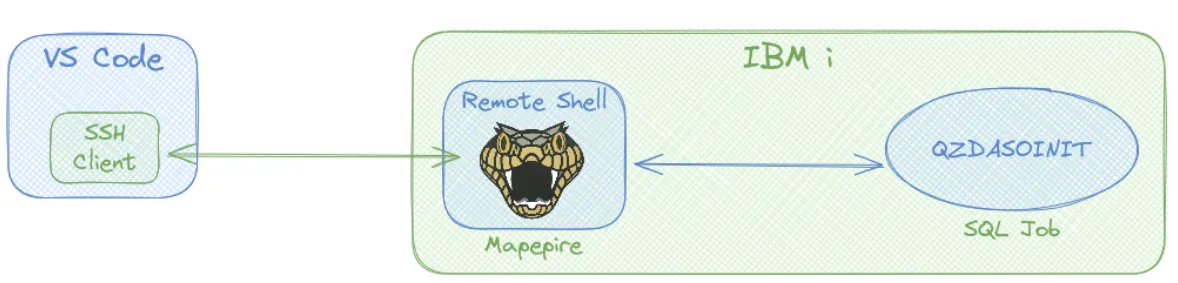
When connecting and using single mode, Code for IBM i will upload the Mapepire jar file under the current user’s .vscode folder under their home directory before starting Mapepire. (i.e. the remote file is ~/.vscode/mapepire-server-X.Y.Z.jar). Code for IBM i takes care of checking and updating the jar file when needed.
Single mode does not require a separate connection and this may be easier if there are network restrictions. But when connecting, starting Mapepire adds the overhead of starting a JVM which can be slow on IBM i. And if there are many connections more IBM i resources may be consumed which might be significant on a smaller machine. And using the Db2 for i extension also creates another SSH channel with its own JVM.
Mapepire is assumed to have been started beforehand and is running on IBM i. It acts as a shared database server, handling every connection coming from clients (through a secure WebSocket connection, by default on port 8076). This one server is used by everyone and it doesn’t support private keys and needs a password to maintain security. So you’ll either enter a password every time you connect or save your password in your connection.
Mapepire server mode is started using no argument when running the mapepire.jar file. See Server Install/Config
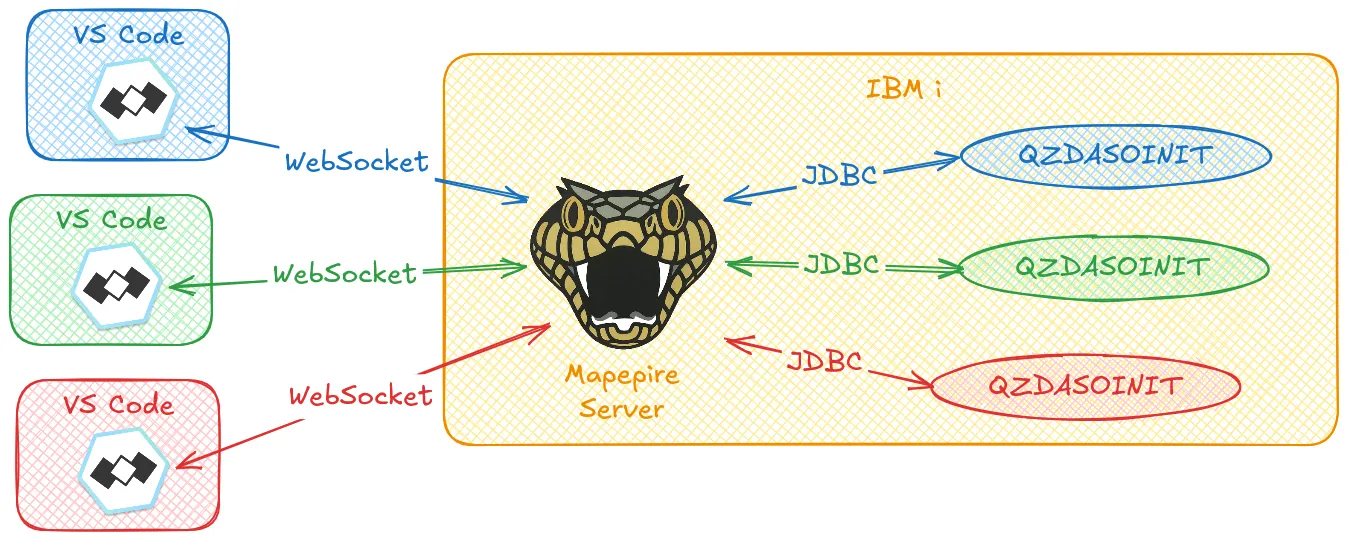
When connecting and using Server mode, Code for IBM i doesn’t upload and use the Mapepire jar file.
Server mode makes the connection faster and it consumes fewer resources globally on the IBM i. But it requires more initial work on the sys admin side to set up and ensure it is running.
Mapepire tab.
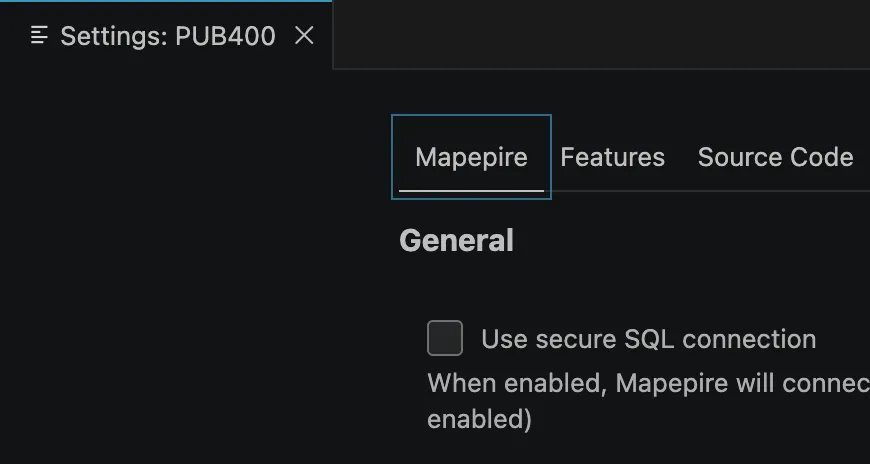
Turning this on will force Mapepire to establish a secured JDBC connection (i.e. it sets the secure JDBC option to true). The connection is secured using TLS between Mapepire and the Database Server daemon (the QZDASRVSD job). Turning this on requires the Database Server daemon to use a valid certificate and accept connections on its secure port (9471 by default). You can also read more about configuring Host Servers with TLS using Navigator for i
.
The naming convention used by the databse job. This setting will affect the syntax and how unqualified SQL objects are resolved.
/ or .. The library list is used to resolve unqualified objects... The current schema is used to resolve unqulified objects.When enabled, spooled files generated by an Action will not be deleted once the action is done. Otherwise, any spooled file generated by an Action will be cleared after it’s done.
Select which version of Java should be used to run Mapepire in Single mode.
java command).When enabled, Code for IBM i will connect through a secure WebSocket to Mapepire.
When enabled, this setting allows validation of either self-signed certificates or certificates from a CA when connecting to a remote Mapepire server.
The TCP port number Code for IBM will use when connecting to a remote Mapepire server. Defaults to 8076.